
Hermes Agent and Nous Portal: what they do and how to set them up
TL;DR Hermes Agent is a free, open-source assistant you run yourself. Nous Portal is the optional account that can supply models, hosted tools and a hosted Cloud agent. Official docs say you can chat with that Cloud agent from a dashboard in your browser. This guide covers what they are, the official install, how to connect Portal, and how the Cloud agent differs from the cloud browser tool.
Disclosure: This guide contains referral and affiliate links (marked “sponsored”). Some links earn me a commission or credit, at no cost to you. I’m not affiliated with these companies. Where a link gives you no perk, I say so. How this works.
Checked against official docs, Nov 13, 2026.
Facts checked
| Tool | New-user perk | Checked |
|---|---|---|
| Nous Portal | $15 off your first month on the $20 plan (new accounts only). Offer may change, check the site before you buy. |
Who it suits
People who want to run Hermes Agent themselves, use Nous Portal as the model and tool provider, or understand the official hosted Cloud agent, including chatting with it from a browser.
Who should skip it
If you only want a one-off chat in a website and do not want to install an agent or open a Portal account, you can skip this setup.

assets/banner.png, checked November 13, 2026.Everything below is from official Hermes Agent and Nous Portal documentation I re-read on November 13, 2026 (America/Los_Angeles). I did not re-run the install, and I did not deploy a Cloud agent for this draft, so this is not a first-hand test report. Where official pages disagree on a count, I say so instead of picking a number.
What Hermes Agent is
Hermes Agent is a free, open-source AI assistant you run yourself. Official docs describe it as an agent harness: it keeps memory, can load skills, and can use real tools (files, a terminal, a browser, and others you turn on), instead of being only a chat box. You can point it at Nous Portal, at your own provider keys, at an OpenAI-compatible endpoint, or at a local model.
The software is published under the MIT license. The official repository is NousResearch/hermes-agent on GitHub (copyright notice on the project: Copyright 2025 Nous Research). The project site is hermes-agent.nousresearch.com.
You can run the same harness in more than one way:
- Hermes Desktop: the official app, with a graphical chat interface. The official quickstart recommends the Desktop installer on macOS or Windows. The official Desktop page also lists Linux.
- The command line (CLI): install with the official shell or PowerShell script, then chat with
hermes. - Hermes Cloud: a hosted, always-on instance of the same agent, described in the next sections. That is optional, and it is not required to try Hermes on your own computer.
Official docs also describe a messaging gateway. After a normal chat works, you can run hermes gateway setup and connect platforms such as Discord, Telegram, Slack and others listed in the docs. The official rule of thumb is: if Hermes cannot complete a normal chat, do not add the gateway, cron jobs, skills or routing yet.
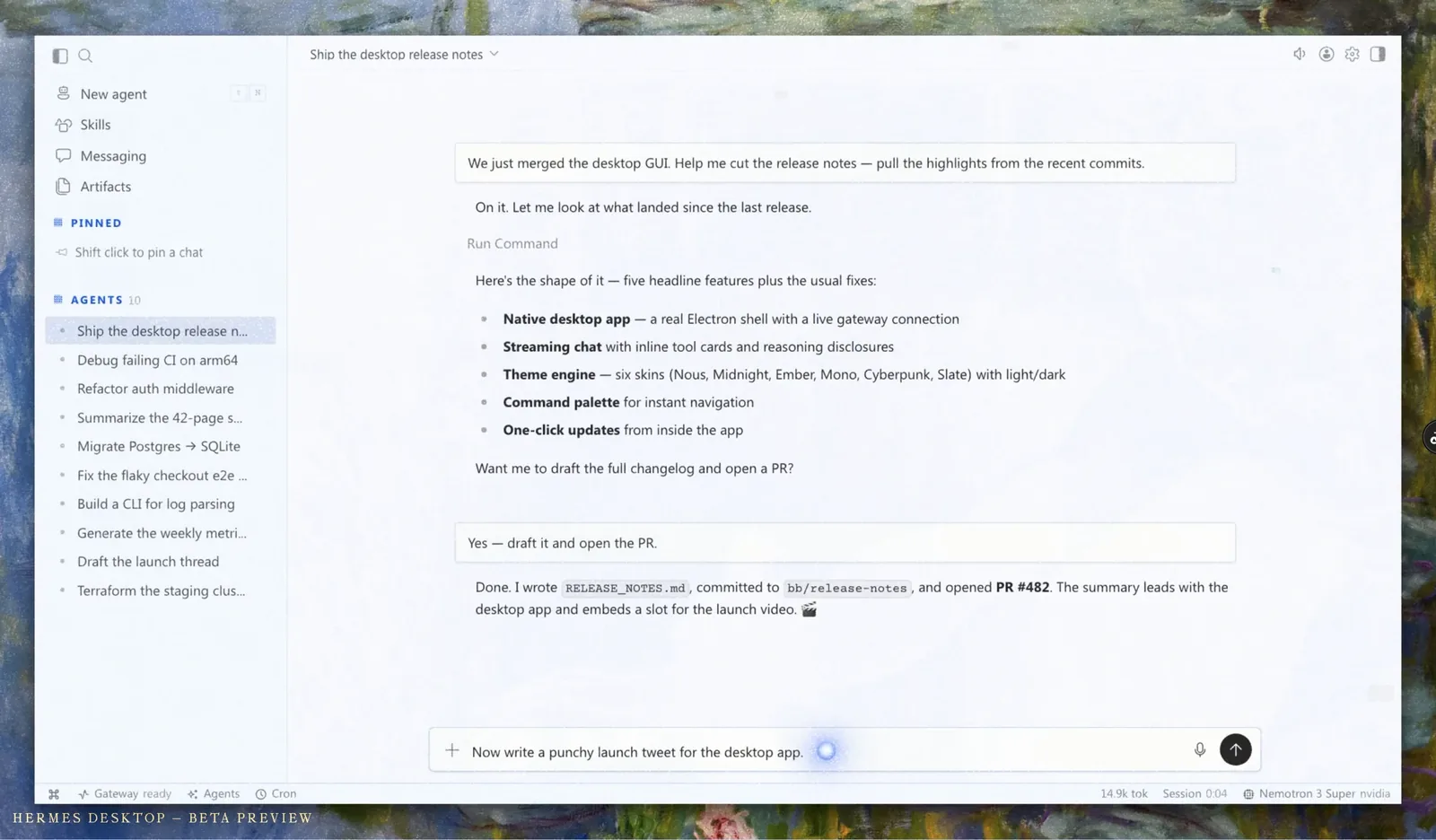
desktop-preview.webp on web-assets.nousresearch.com). Credit: Nous Research.That screenshot is official product marketing, not a picture I took. Features you see in the sample conversation (release notes, a pull request, a model name in the corner) are part of the screenshot, not a test I ran.

What Nous Portal is
Nous Portal is Nous Research’s account for models, hosted tools and Cloud hosting. Official docs call it the recommended way to run Hermes Agent if you want one sign-in instead of a separate key for every model lab, search API, image generator and browser provider.
On official pages, one Portal login can cover three things:
- A model catalog. Official wording on the size of that catalog is not identical everywhere. On November 13, 2026, the Hermes Agent quickstart said “300+ models,” and the Hermes Cloud / hosting pages also showed a “200+ models” catalog label. I am not choosing one number. The live list is inside the Portal.
- The Tool Gateway (on paid plans): official docs say this routes tool calls through Nous-managed infrastructure. Hosted tools listed on paid plans include web search, image generation, text-to-speech and a cloud browser.
- Hermes Cloud (on paid plans): official docs say paid plans include hosting for one Cloud agent, up to the plan’s included size. Extra or larger agents are billed separately, by the day, from pay-as-you-go credits.
You do not have to use Portal. Official docs also support other providers and your own keys. If you only have time to set up one official path, the docs say to set up Portal.
How the two fit together
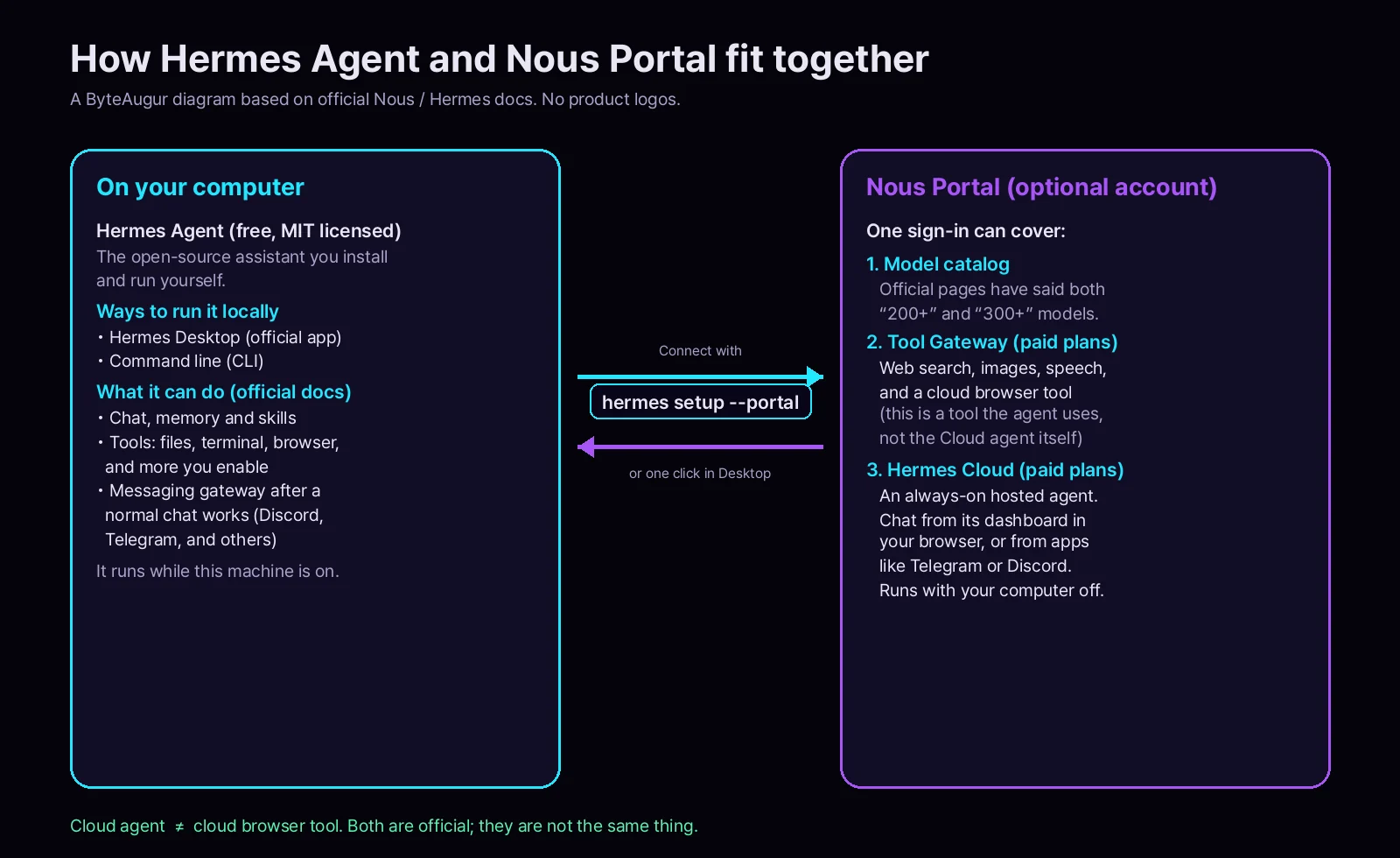
Hermes Agent is the assistant software. Nous Portal is the optional account that can supply models, hosted tools and a hosted place for the agent to live. The official fastest link between them is one command, hermes setup --portal, or one click in Hermes Desktop.
Install Hermes and get one chat working
These steps are from the official Hermes Agent quickstart, checked November 13, 2026. They are not a first-hand re-run for this draft.
-
Install the app or the CLI. On macOS or Windows, the official recommended path is the Hermes Desktop installer from the Hermes Desktop page. The same page also lists a Linux app. For a command-line install without Desktop, the official commands are:
Linux, macOS or WSL2:
curl -fsSL https://hermes-agent.nousresearch.com/install.sh | bashWindows PowerShell:
iex (irm https://hermes-agent.nousresearch.com/install.ps1)After the script finishes, reload your shell (
source ~/.bashrcorsource ~/.zshrc, depending on what you use). The official quickstart points to a longer installation guide for prerequisites and troubleshooting, and to a separate Termux APT guide for aarch64 Android devices. -
Get one clean chat working before you add anything else. The official rule of thumb is: if Hermes cannot complete a normal chat, do not add the gateway, cron, skills, voice or routing yet.
-
Pick a provider. The official interactive command is
hermes model. The official easiest path is Nous Portal, in the next section. Official docs also mention importing a setup from tools such as OpenClaw, Claude Code, Codex CLI or Cursor when a freshhermes setupfinds one of them on your computer. -
Start chatting. Official quick reference: run
hermesto start a chat, andhermes --continueto resume the last session. -
Only then add messaging, if you want it. Official docs say
hermes gateway setupis an interactive wizard for platforms such as Telegram, Discord, Slack and others, andhermes gatewaystarts the messaging gateway.hermes doctoris the official first stop when something is off. Other official recovery commands on the quickstart includehermes model,hermes setup,hermes sessions list,hermes --continueandhermes gateway status.
Connect Nous Portal
On a fresh install, the official one-command path is:
hermes setup --portalThe official quickstart and the Nous Portal integration doc say that command logs you in through Portal OAuth, sets Nous as your provider, and turns on the Tool Gateway. The integration doc also says a refresh token is stored at ~/.hermes/auth.json. In Hermes Desktop, official docs describe the same setup as one click.
If you would rather walk through providers yourself, official docs say to run hermes model or a full hermes setup.

The Cloud agent, and using it from a browser
This part is easy to mix up, so here is what official pages actually say, and where they say it.
Hermes Cloud is a real, official product. It is a hosted, always-on Hermes Agent that runs on a dedicated cloud instance, with its own workspace and dashboard. Official descriptions are on the Nous Portal Cloud page and the Hermes Agent hosting page, both checked November 13, 2026.
You can reach a running Cloud agent in more than one way. The official hosting page says you can “chat from its dashboard in your browser,” or connect apps such as Telegram, Slack or Discord (it also lists WhatsApp, email, the CLI, “and more”). In other words: the hosted agent is not only a background box. Official docs say it has a browser dashboard you can chat from. I have not signed in and clicked through a live dashboard for this draft, so I am describing the official pages, not a walkthrough of the UI.
cloud-card.png on web-assets.nousresearch.com). Credit: Nous Research.Official pages also say, in substance:
- Paid plans include one Cloud agent, up to the plan’s included size. The Free plan does not include Cloud hosting.
- To deploy, official Cloud copy says you need a $2 minimum in credits, or an active subscription. Setup is described as: sign in, add credit, open the deploy flow, name the agent, choose a model and a size, then deploy. After provisioning, “your agent’s dashboard is ready to use.”
- The instance is billed from your Nous credit once each day (UTC), in arrears, based on that day’s use. While it is running, you pay compute (officially metered to the second of actual uptime) plus storage. While it is stopped, you pay storage only, and official docs say the workspace, memory and configuration persist. Inference and tool usage are billed separately, on top of the instance price.
- Official docs say the platform picks the closest location that has availability. The Cloud page lists possible regions, including Amsterdam, Stockholm, Mumbai, Paris, Dallas, Frankfurt, Los Angeles, London, Tokyo, Chicago, Singapore, San Jose, Sydney and Toronto.
- Each cloud agent runs in its own isolated container with a persistent workspace. You can manage instances from the Portal (official docs also mention an
/agentspage, and a separate guide for managing Cloud through MCP from a local Hermes install). - Extra or larger agents, beyond the one included in a paid plan, are billed by the day. Official docs say current sizes and prices are shown in the Portal create flow before you deploy. I am not inventing those day rates here.
Included instance sizes, from the official plan tables checked November 13, 2026:
| Plan | Price | Cloud hosting included |
|---|---|---|
| Free | $0, pay as you go | None |
| Plus | $20 / month | One agent, up to 4 GB RAM and 25 GB disk |
| Super | $100 / month | One agent, up to 4 GB RAM and 100 GB disk |
| Ultra | 200 dollars / month | One agent, up to 8 GB RAM and 100 GB disk |
The cloud browser tool is something else
Official docs describe a second, different “browser” idea, and it is easy to flatten into the Cloud agent. They are not the same thing.
The cloud browser is a Tool Gateway feature: a browser the agent can control to click, type and read pages. The Nous Portal integration doc lists “Cloud browser automation” (via Browser Use) among hosted tools, as headless cloud Chromium sessions. The official browser automation guide says the agent’s browser_exec tool can drive a browser over the Chrome DevTools Protocol, and that the browser itself can come from several places: a local Chromium Hermes launches by default, cloud browsers (including the Nous subscription, Browserbase, Browser Use cloud, Firecrawl, or a plugin), Lightpanda, or your own running browser.
So:
- Hermes Cloud is a hosted instance of the agent. Official docs say you can chat with it from a dashboard in your browser.
- A cloud browser is a tool that a Hermes agent (local or hosted) can use to operate a web page.
Official docs also note that for simple lookup, web_search or web_extract is preferred, and that the browser is for interaction (clicking, forms, dynamic pages). Cloud browser sessions can consume provider credits; local Chromium and a connected local browser are described as free of that session charge.
Plans, prices and what is included
Hermes Agent itself is free and open source. Money enters the picture if you use Nous Portal models, hosted tools or Cloud hosting. Official plan tables, checked November 13, 2026, list four tiers:
- Free: $0, pay as you go. Free models only. No hosted tools. No Cloud hosting. Standard rate limits.
- Plus: $20 / month. Official copy describes this as the path for everyday personal use. Free and paid models, hosted tools, and one Cloud agent up to 4 GB RAM and 25 GB disk. High rate limits.
- Super: $100 / month. Official tables say usage is 5× Plus, with a larger disk (100 GB) on the included Cloud agent (still 4 GB RAM).
- Ultra: 200 dollars / month. Official tables say usage is 10× Plus, and the included Cloud agent goes up to 8 GB RAM and 100 GB disk.
I am not inventing a dollar figure for “how far included usage goes” beyond those official multipliers. Official pages also say pay-as-you-go top-ups exist on the paid plans, and that subscriptions are month to month. The official hosting FAQ says you can stop or delete an agent from its dashboard, and that you can manage or cancel a subscription from Nous Portal. Always re-read the live pricing page before you pay; plans change.
The official Portal site also mentions connecting an eligible ChatGPT account for supported inference, with tools and Hermes Cloud hosting charged separately. I am not expanding that into a how-to here; see Nous Portal’s own “Learn more” copy for the current terms.

The signup perk
If you are opening a new Nous Portal account, the ByteAugur perk is $15 off your first month on the $20 plan (new accounts only). Offer may change, check the site before you buy. Open Nous Portal (sponsored). (My referral link.)
The same wording is on the Nous Portal deal page, which also explains how to redeem it: open the referral link before you create the account, then choose the $20 plan to get $15 off your first month. Official plan prices above are the list prices, not a promise that every month after the first will be discounted.
FAQ
What is the difference between Hermes Agent and Nous Portal?
Hermes Agent is the free, open-source assistant you install, or that Portal can host for you. Nous Portal is the optional Nous Research account for a model catalog, hosted tools and Cloud hosting. Official docs recommend Portal as the fastest provider path, but you can use other providers or your own keys.
Do I have to pay to try Hermes Agent?
No. Official docs say the harness is free and open source. The Free Portal tier is $0 pay as you go, with free models only and no Cloud agent. Paid Portal plans are what add hosted tools and included Cloud hosting.
Can I use a Cloud agent from my browser?
Yes, according to official docs. The Hermes Agent hosting page, checked November 13, 2026, says you can chat from the agent’s dashboard in your browser, or from connected apps. The Portal Cloud page describes that dashboard as ready once provisioning finishes. I have not taken a first-hand tour of that dashboard for this draft. Official sources: hermes-agent.nousresearch.com/ai-agent-hosting and portal.nousresearch.com/cloud.
Is that the same as the cloud browser?
No. The Cloud agent is a hosted Hermes instance. The cloud browser is a tool that an agent can use to operate web pages, listed with other hosted tools on paid plans. Official browser docs: Browser automation and the Nous Portal integration page.
How do I connect Portal after I install Hermes?
Official docs say to run hermes setup --portal on a fresh install, or to use the one-click path in Hermes Desktop. That official flow logs you in, sets Nous as the provider, and turns on the Tool Gateway.
What does the $20 Plus plan include?
From the official tables checked November 13, 2026: paid models as well as free ones, hosted tools (web search, images, speech, cloud browser), high rate limits, and one Cloud agent up to 4 GB RAM and 25 GB disk. Official usage amounts besides “shared” (Plus) and the 5× / 10× multipliers on Super and Ultra are not stated as raw numbers on those tables, so I am not inventing them.
What does the signup perk get me?
$15 off your first month on the $20 plan (new accounts only). Offer may change, check the site before you buy. Open the referral link before you create the account. Open Nous Portal (sponsored). (My referral link.)
Do I have to host the agent on Hermes Cloud?
No. Official docs describe Hermes Desktop or the CLI on your own computer, and Cloud as an option so the agent can stay online when that computer is off. Paid plans include one Cloud agent up to the plan’s size; you do not have to deploy it.
Official sources
All checked November 13, 2026:
- Hermes Agent site and quickstart
- Hermes Desktop
- Hermes Cloud / hosted agent and Portal Cloud
- Nous Portal integration and portal.nousresearch.com
- Browser automation
- Manage Hermes Cloud with MCP
- GitHub repository (MIT)
Prices, regions, catalog size and plan limits can change. Read the live official pages before you pay or deploy.